
BooHue1.0.3 - Google Play
You'll be able to see results in few seconds.
Publisher Description
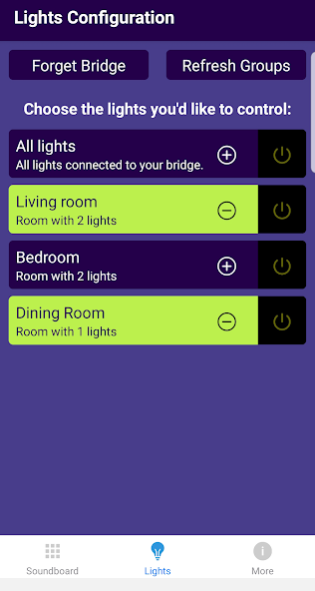
Control spooky sounds with Philips Hue light shows. Tell a story by combining Atmosphere sound loops with Suspense and Surprise one-shot effects to scare and delight. Easily connect Hue bridge and select light groups . Fun for kids and grown-ups.
Select AutoHaunt to keep the haunt going by cycling through Atmospheres while randomly playing Suspense and Surprise events. Great for a halloween party or to spook trick-or-treaters.
Atmospheres blend low light with haunting music and sound effects to create the mood.
Haunt your house with Suspense and Surprise effects.
Choose which rooms are affected, unaffected or off using Lights Configuration.
Sound & Light Effects include:
Atmospheres:
Haunted House
Corn Field
Graveyard
Wolf Cave
Suspense:
Spider
Cauldron
Owl
Black Cat
Zombie Hand
Eyeball
Coffin
Bat
Surprise:
Witch
Frankenstein’s Monster
Vampire
Jack-o-Lantern
Ghost
Mummy
Skull and Crossbones
Grim Reaper
Tag your haunts with #BooHue #ShareYourScare to share the fun with other BooHue users.
About BooHue
The company that develops BooHue is PalaceLogic. The latest version released by its developer is 1.0.3.
To install BooHue on your Android device, just click the green Continue To App button above to start the installation process. The app is listed on our website since 2020-10-17 and was downloaded 0 times. We have already checked if the download link is safe, however for your own protection we recommend that you scan the downloaded app with your antivirus. Your antivirus may detect the BooHue as malware as malware if the download link to com.palacelogic.boohue is broken.
How to install BooHue on your Android device:
- Click on the Continue To App button on our website. This will redirect you to Google Play.
- Once the BooHue is shown in the Google Play listing of your Android device, you can start its download and installation. Tap on the Install button located below the search bar and to the right of the app icon.
- A pop-up window with the permissions required by BooHue will be shown. Click on Accept to continue the process.
- BooHue will be downloaded onto your device, displaying a progress. Once the download completes, the installation will start and you'll get a notification after the installation is finished.
Program Details
System requirements
Download information
Pricing
Version History
version 1.0.3
posted on 2020-10-17
updated UI, bridge discovery, manual ip, no-sleep play screen
Disclaimer
Official Google Play Link
We do not host BooHue on our servers. We did not scan it for viruses, adware, spyware or other type of malware. This app is hosted by Google and passed their terms and conditions to be listed there. We recommend caution when installing it.
The Google Play link for BooHue is provided to you by apps112.com without any warranties, representations or guarantees of any kind, so access it at your own risk.
If you have questions regarding this particular app contact the publisher directly. For questions about the functionalities of apps112.com contact us.
